The Kiddays app exists because family memories do not need another feed. They need a calm place where the small things survive: the voice note, the first drawing, the birthday countdown, the photo that would otherwise disappear into a camera roll.
I am building Kiddays as a private iOS journal for a child’s first 18 years. It is not trying to be a parent social network. It is closer to a family memory box, but built for the way parents already capture life now: photos, notes, audio, milestones, maps, and shared moments.
Overview
Why I’m Building the Kiddays App
Most parents already document everything. The problem is that the evidence is scattered. Some memories sit in Photos. Some are in chat threads. Some are in Notes. Some are in a grandparent’s phone. After a few years, the timeline becomes searchable only if you already know what you are looking for.
Kiddays is my attempt to make that timeline intentional. A parent should be able to save a moment in seconds, add context while the memory is still fresh, and find it years later without digging through thousands of random photos.
The product idea is simple: one private place for the moments that matter before they turn into digital clutter.
What Kiddays Does
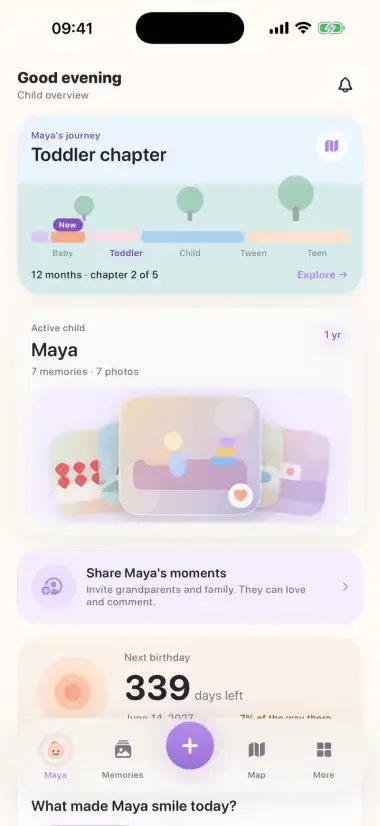
Kiddays lets you save photos, voice notes, memories, milestones, letters, family moments, and birthday countdowns around a child’s life. The current public site describes the product as a private, ad-free family journal with no public feed, iCloud-based storage, and export when needed.
Capture

The capture flow matters most to me. If it takes too long, parents will not use it. The app needs to feel quick enough for a normal day, not like a scrapbook project you keep postponing.
That is why the app is built around small saves: a photo, a quote, a mood, a voice memo, a milestone, or a letter for later. It should be useful even if you only have 20 seconds.
The App Is Native iOS
Kiddays is not a web wrapper. The iOS app is native SwiftUI with SwiftData, local-first storage, iCloud sync work, notifications, voice memo capture, export, and English/Swedish localization in progress.
That native layer matters because the product deals with private family data. The app has to feel like it belongs on the phone. It also needs the platform features parents expect: camera, photos, voice recording, reminders, local storage, iCloud, and export.
Memories
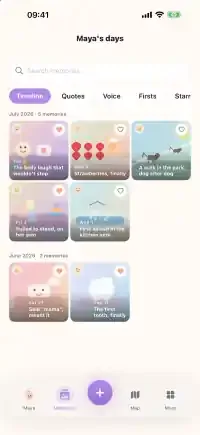
The website is separate from the app. It is an Astro and Cloudflare Workers site with a waitlist. It is not the child-memory backend. That separation is deliberate: the public site collects beta interest, while the app is where the private family content belongs.
The same local-first privacy instinct also shows up in Memento Native→, but Kiddays applies it to family memories instead of screen memory.
Privacy Is The Product, Not A Checkbox
The line I care about is this: Kiddays should not turn family memories into engagement data.
That means no ads, no public feed, and no product idea that depends on strangers seeing your child’s life. The public positioning is privacy-first because the product only makes sense if parents trust it.
Family sharing
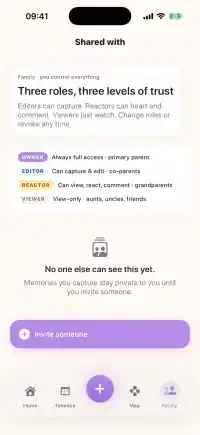
Family sharing is one of the hardest parts to get right. Parents want grandparents and co-parents involved, but they do not want every memory to become public inside the family by accident. The app work is moving toward private-per-memory rules, viewer/editor permissions, retraction behavior, and real CloudKit verification before that gets treated as finished.
That is why I am not calling Kiddays App Store-ready yet. It is in private beta/waitlist mode. The honest status is better: the product exists, the screens are real, the app is under active verification, and I am taking the privacy and family-sharing details seriously before pushing it as finished.
The Lifetime Map Angle
One of my favorite parts is the idea that a child’s memories can become a gentle map, not only a folder.
Lifetime map
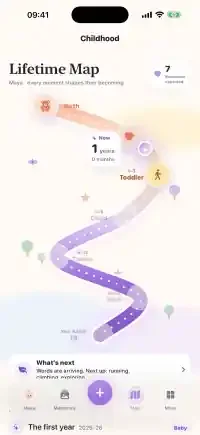
A photo from a birthday, a park visit, a first trip, a school moment: these are not only images. They have time, place, and context. Kiddays can make that history visible without turning it into surveillance or a public profile.
The map is useful because memory is spatial. Families remember places. The app should help you revisit those places without making location feel like a data product.
What I Like About The Current Direction
The app finally feels like something with a clear reason to exist. It is not a generic productivity app with family branding. It is built around one emotional job: help parents keep the moments they will care about later.
Launch
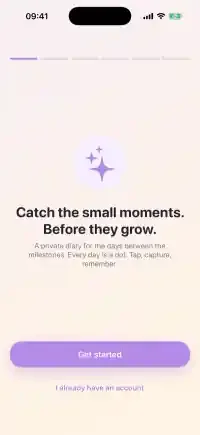
I also like that the product is small enough to explain without a pitch deck. Save the moment. Keep it private. Look back together. Export when you need to.
That constraint helps the engineering too. Every feature can be judged against the same question: does this help a family preserve memories, or does it only make the app look busier?
What I Checked Before Writing
I checked the live Kiddays site, the real app repository, the website source, the public app screenshots, and the current production-readiness notes before writing this. The important constraint is that Kiddays should be described as a real private beta, not as a finished App Store launch.
Current Status
Kiddays is on the site now as one of my own Apple/private app projects, next to the other things I am building. The public product page is live at kiddays.app, and the app is in private beta/waitlist mode.
The next work is not glamorous, but it matters: real-device testing, iCloud behavior, export checks, family-sharing verification, App Store readiness, legal copy, and the kind of edge cases that decide whether a private family app deserves trust.
That is the version of Kiddays I want to ship: not louder, not more social, not packed with unnecessary features. A private family journal that does the job well and stays out of the way.