Online mastering services sell different jobs under the same promise: a release-ready song. One service wants a finished stereo mix. Another accepts your vocals, drums and bass separately. A third books an engineer, then charges extra for the delivery formats you need.
Those are different jobs, even when all three websites promise a release-ready song.
I wanted a useful comparison of online mastering services: what you upload, what you receive, how you pay and where the service stops. That includes established platforms, smaller alternatives and the mix-analysis and mastering workflow I am building with Mixanalytic.
Disclosure: I am the founder of Mixanalytic. It is my own product, not an independent recommendation. This guide compares documented offers; I have not run a controlled, level-matched listening test of all 14 services, and the order is not a sound-quality ranking.
Research snapshot: November 13, 2026. Prices below retain the currencies shown by the providers. Sales, tax, location and annual commitments can change the amount you pay. I did not complete purchases or test paid-account entitlements.
Which online mastering service do you need?
Start with the files you have and the problem you need to solve.
| Your situation | Service category | What to expect |
|---|---|---|
| You have a finished stereo mix | Automated stereo mastering | Processing of the combined song, with limited control over individual instruments |
| You still have separate vocals, drums and instruments | Multitrack mixing and mastering | Decisions about balance between tracks, followed by processing of the final mix |
| You cannot identify the problem in your mix | Mix analysis and feedback | Measurements and advice; you make the changes in your audio editor |
| You need discussion, revisions or physical-release delivery | Human mastering | An engineer, an agreed brief and specified deliverables |
Mixing changes relationships inside the song. Mastering works on the final presentation. A stereo mastering engine cannot offer the same independent vocal control as a service receiving the vocal file separately. Abbey Road's explanation of mixing and mastering makes that distinction clear.
14 online mastering services compared at a glance
This is a researched shortlist, not a claim to list every mastering business worldwide. The detailed sections explain the limits behind the short descriptions.
| Service | Main job | Price or billing checkpoint |
|---|---|---|
| Mixanalytic | Mix analysis plus separate stereo Mastering Studio | Free analysis tier; Supporter subscription for mastering |
| LANDR | Stereo mastering within a broader music platform | Official product page lists $10 for one master; subscription formats vary |
| eMastered | Stereo mastering and a bundled creator toolkit | $39 month-to-month; $180/year upfront; $19/month with a one-year commitment |
| BandLab | Preset-based stereo mastering | Four free presets; paid controls depend on membership |
| Waves Online Mastering | Stereo mastering with style and reference controls | Credit packs or annual plans; observed single credit $3.99 |
| DistroKid Mixea | Stereo mastering with multiple variations | $99 USD/year after the first free mastered track |
| FL Cloud | Mastering inside FL Studio | FL Studio and optional FL Cloud subscriptions are separate purchases |
| Masterchannel | Automated mastering and engineer sound profiles | Artist displayed at EUR 180/year; Professional EUR 228/year |
| RoEx Automix | Multitrack mixing, mastering and editable exports | Starter pay-per-download; Pro subscription |
| Cryo Mix | Stem mixing, stereo mastering and conversational controls | Download credits; format and duration limits vary by plan |
| OneMaster | Stereo mastering, beat-and-vocal processing and stem mixing | $9.90 single song credit; first-song offer $4.90 |
| MasteringBOX | Stereo mastering with format-based tiers | Free tier; paid MP3/M4A and WAV allowances differ |
| Abbey Road | Human remote mastering | Build a project for current package and engineer pricing |
| Metropolis | Human remote mastering; mixing booked separately | First-available mastering engineer from $120, excluding applicable VAT |
Mixanalytic: understand the mix, then master it
I want producers to understand a problem before paying to process the same problem again. That is the practical reason for putting mix feedback and mastering next to each other.
Mixing support without pretending to replace your session
Mixanalytic's analyzer checks an exported track for frequency balance, dynamics, stereo, loudness and related technical issues. Its reports help you decide what to revisit in your DAW. They do not automatically remix your individual vocal, kick and bass channels.
The free plan includes two full analyses a month. Supporter adds a larger allowance and plugin-aware advice, so recommendations can reflect the tools you own. I would use a report to choose a listening check, make the change in the session, then compare the next export. A higher score alone is not proof of a better song.
I covered the reasoning behind this workflow in my Mix Analyzer overview.
What the Mastering Studio offers
The public Mastering Studio page describes four 24-bit WAV versions per run: Dynamic, Balanced, Loud and Chart. Their starting targets are -14, -11, -8.5 and -7.5 LUFS respectively. These are processing targets, not guaranteed achieved loudness or universal release requirements.
My guide to LUFS and true peak explains the measurements behind these labels.
You can compare versions at matched playback loudness and read explanations of EQ, compression and limiting. The engine can stop below a target to limit damage to transients. That makes the comparison more useful than choosing whichever file starts louder.
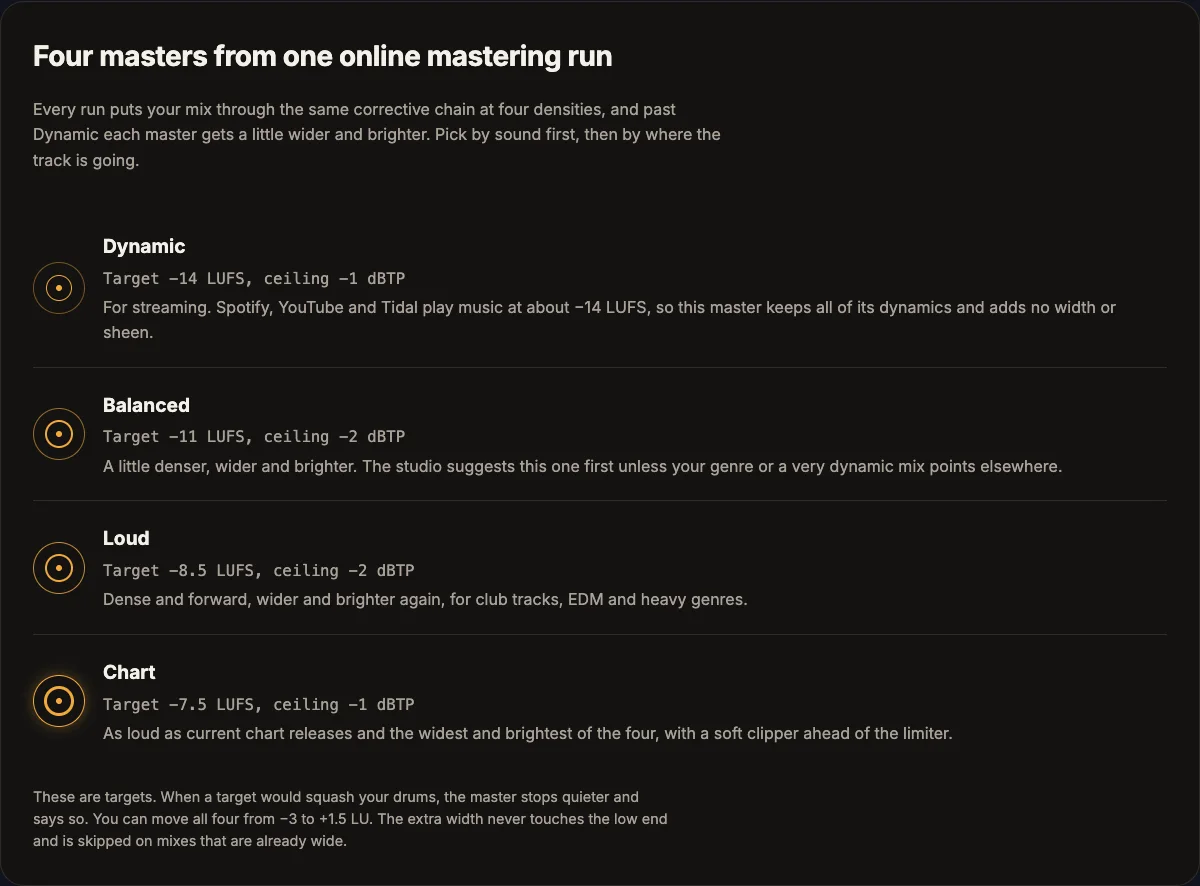
Mixanalytic's public product page, captured November 13, 2026. These are the four published starting targets, not results from a cross-service listening test. Image: Mixanalytic.
This is stereo mastering. The published exclusions include stem mastering, Dolby Atmos, album sequencing and DDP delivery. Source uploads are deleted after the run; the page describes 30-day master retention for Supporters, with an option to keep a run.
Price and included runs
The mastering page lists 20 included monthly runs for Supporters, then 85 tokens per additional run. Those are separate from the mix-analysis allowance. The pricing page shows Supporter at $25/month or $240/year, with a first-year annual offer of $120 through November 30, renewing at $240/year.
My aim is an understandable loop: check the mix, fix what needs fixing, then compare masters by ear. It does not make every release a candidate for automation. An important album may still deserve a dedicated engineer.
Established automatic mastering platforms
LANDR: consider the bundle and the download format
LANDR combines online mastering with a wider ecosystem that includes distribution and production tools. Its mastering page lists reference matching, album-oriented batch processing and a $10 single-track option.
The format distinction matters. The official overview separates MP3 access from WAV and HD WAV access across Studio tiers. Do not buy an entry plan assuming every lossless format is unlimited; inspect the current allowance on the pricing page.
I would consider LANDR when the surrounding distribution and production tools replace subscriptions I already need. For one occasional master, the per-track route is easier to evaluate than an annual bundle. Neither route buys a personal engineer's revision conversation.
eMastered: check the commitment, not only the monthly number
The official eMastered plan explanation lists unlimited mastering, distribution subject to fair usage, stem separation, ATOM synthesizer access and Linkify within its Studio offer.
Stem separation extracts components from an existing recording. That feature alone does not establish an automatic multitrack mixing service.
The rendered plan comparison on eMastered shows $39 month-to-month, $180 billed upfront for a year, or $19/month with a one-year commitment. Prices exclude VAT; taxes apply at checkout. The $15/month headline is the annual upfront price divided by twelve, not a monthly cancellation option.
This is a bundle to price against your actual usage, not just the number of masters advertised.
BandLab: start with the free presets
BandLab's mastering documentation lists four free presets: Universal, Fire, Clarity and Tape. It separates those from additional membership presets and controls. Mastering EQ is identified as a Max feature.
That gives a new producer a low-cost way to compare different treatments of the same mix. Try it before assuming a paid service is necessary for every demo.
The limitation is control and suitability, not a documented verdict on sound quality. A preset that flatters one arrangement may not suit another. Check the exact free-versus-paid boundary; do not assume every control shown in a tutorial belongs to the free tier.
Waves Online Mastering: price the credits you will use
Waves Online Mastering offers style, tone and reference controls. The free preview covers 30 seconds; a full-length master uses a credit.
The pricing page displayed $3.99 for one credit, $17.45 for five and $44.85 for fifteen during this check. Annual offers included Standard at $71.64 for 36 credits and Pro at $169.99, advertised as unlimited. Confirm current fair-use terms and regional checkout availability rather than reading unlimited as an unrestricted commercial API license.
For occasional releases, a small pack avoids paying for unused months. For frequent work, compare the annual cost against the number of downloadable masters you expect to keep. A free preview is not a free full-length export.
DistroKid Mixea: straightforward annual stereo mastering
Mixea advertises a first free mastered track, then unlimited mastering for $99 USD a year. Its product page specifies 24-bit, 48 kHz WAV delivery. DistroKid's How Much Does Mixea Cost? page confirms annual renewal.
The official How Do I Use Mixea? guide describes 15 generated variations, selected through intensity and EQ controls. You choose between versions of the combined mix, rather than giving separate instructions for each instrument.
This may suit someone releasing regularly who wants a simple repeatable process. Someone finishing two songs a year should compare that annual bill against per-song alternatives. Keep the mastering subscription and your distribution arrangements distinct when reviewing charges.
FL Cloud: an integrated route for FL Studio users
FL Cloud Mastering runs inside FL Studio and offers genre-customizable processing. The current page lists mastering within paid Plus and Pro plans and offers a 30-day trial. It also states that the paid trial starts billing unless you cancel.
Image-Line's separate CloudBounce notice says every FL Studio license includes the default mastering reference, with fuller genre options through FL Cloud. Those descriptions differ in emphasis, so check the presets available in your installation before buying another plan.
Existing FL Studio users should inspect this route before adding another browser service. Buying a DAW solely for mastering requires a different cost calculation. FL Studio and FL Cloud are separate products.
Smaller alternatives and newer workflows
These are alternatives to the familiar default choices, not a claim that every company below launched this year. A smaller name also does not establish better audio or weaker engineering.
Masterchannel: engineer profiles without hiring that engineer
Masterchannel emphasizes automated mastering, tonal and dynamic controls, and sound profiles associated with engineers. Its pricing page displayed Artist at EUR 15/month billed as EUR 180/year, and Professional at EUR 19/month billed as EUR 228/year.
Professional adds the Wez Clarke profile and further sound adjustment. The Partner offer introduces multi-user and white-label options under additional terms. An engineer's profile is not a booking for that engineer to listen personally to your track.
The album and bulk features make this worth investigating for recurring output. Compare its yearly commitment, controls and storage terms with your release schedule. The quoted monthly equivalents are not cancel-anytime monthly prices.
RoEx Automix: mixing from stems, with a route back to your DAW
RoEx Automix accepts stems for automated mixing and mastering, with a Mix Console and editable project exports. Its plan page distinguishes Starter's 16-track mixing from Pro's 32-track workflow.
Pro lists unlimited mix/master downloads, processed stems, DAW exports, reference matching and desktop access. Starter uses pay-per-download. The pricing page did not expose a reliable monetary amount in the captured view, so check the current checkout instead of treating an older dollar figure as current.
The editable handoff is the feature I would investigate first. It lets you evaluate automation as a starting point while preserving a route to further production decisions. Export compatibility still needs checking against your DAW and version.
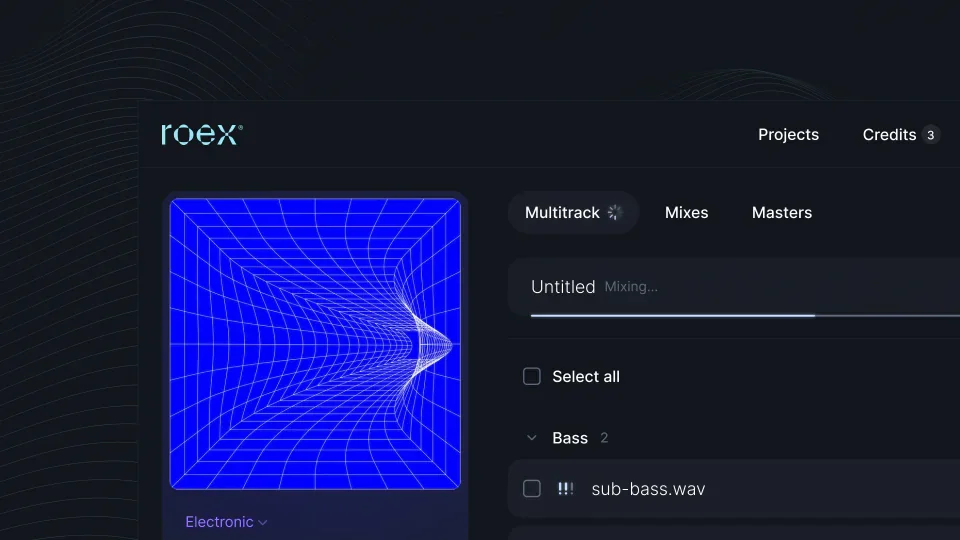
Official Automix project-view image from RoEx's product page. It illustrates a stem-based workflow rather than a stereo-only upload. Image: RoEx.
Cryo Mix: conversational mixing with export limits to inspect
Cryo Mix combines stereo mastering and stem mixing with Nova, its conversational assistant. Its current plan comparison lists up to 32 stems, with consolidation for larger sessions, and charges one Mix & Master Online credit when you download a project.
The tiers differ materially: Essential lists five monthly credits, seven-minute files and 16-bit/44.1 kHz output; Creator lists ten credits and up to 24-bit/48 kHz; Pro lists thirty credits and up to 32-bit float/48 kHz.
I could not verify the dynamically loaded monetary amounts. The current credit table is more useful than an older help article describing uncapped use. Check the purchase screen for the amount and entitlements, including revisions. A higher export bit depth alone does not establish a better-sounding mix.
OneMaster: pay per song, with a smaller stem count
OneMaster advertises stereo mastering, separate beat-and-vocal processing and AI mixing from two to eight stems. You can hear the full result before spending a song credit on the download.
Its pricing lists a $9.90 single credit, a $4.90 first-song offer, three songs for $24.90 and fifteen for $89.90. Song credits do not expire. The page lists 24-bit WAV delivery and three revisions on the same files for paid masters; verify the separate conditions for reference-matched processing before relying on that allowance.
The small stem limit may suit grouped exports or beat-and-vocal releases. It is less suitable for uploading a large multitrack session untouched. Confirm what the service counts as a revision before swapping source files.
MasteringBOX: read the WAV allowance
MasteringBOX's pricing page separates a free tier with one master per day from paid tiers. Basic emphasizes unlimited MP3/M4A mastering; Pro lists three WAV/HD masters per month; Unlimited lists mastering in all formats.
The page displayed $7.99, $12.99 and $24.99 per month respectively, alongside an annual-billing control. Confirm the selected billing period and full charge before purchasing; I am not treating those displayed amounts as proof of month-to-month cancellation terms.
This is a useful example of a comparison trap: unlimited processing or compressed exports can sit beside a limited lossless allowance. Price the tier that delivers the file you need, not the cheapest tier carrying the word mastering.
Human online mastering: you are paying for a different service
Abbey Road: select a package and speak to an engineer
Abbey Road's remote mastering lets you choose a package and engineer, upload tracks, communicate and download the finished work. The current page explicitly excludes stem mastering from this online service, even though Abbey Road offers other services separately.
That distinction matters: a studio's wider capabilities do not automatically belong to its entry online package.
I did not verify a current base quote from the booking portal, so I am not recycling the GBP 90 figure found in older articles. Build the actual project and confirm formats, revisions and delivery date. This is a route to investigate when you want an engineer to discuss the release with you, rather than another set of algorithmic variations.
Metropolis: compare the complete delivery package
Metropolis Online displayed first-available-engineer mastering from $120 per track, excluding applicable VAT. Named engineers have different rates. The included delivery is 16-bit/44.1 kHz WAV; additional formats and DDP can add cost.
The support terms include one mastering revision, but distinguish that from a new or replacement mix, which may cost extra. They also separate online stereo mastering from bespoke stem work and attended sessions.
Get the whole release quoted: main mix, instrumental, alternate versions and physical formats. A headline studio rate and an automated 24-bit download are not like-for-like products. Ask whether your requested change counts as a revision before submitting a new bounce.
What about CloudBounce and mastering plugins?
CloudBounce belongs in the historical notes, not the active buying list. The official closure notice states that the company permanently closed on June 30, 2025, and describes its technology continuing inside FL Studio. An old directory entry is not evidence of a current standalone subscription.
Plugins are another category. A mastering assistant inside your DAW lets you work locally and adjust a chain. An online service processes a file, while an engineer accepts a brief. Compare those routes by the work you want to retain or delegate, rather than putting every product under one AI label.
Which option would I choose?
My first question would be whether the mix is ready. If I am uncertain, I want feedback before another loudness pass. That is where I would start with Mixanalytic's free mix checks.
For a finished stereo file and no budget, I would try BandLab's free presets. For a few releases, I would compare per-download offers against the real annual total. For recurring output, I would price a subscription using the number of songs I expect to finish, not an optimistic unlimited maximum.
For separate tracks, I would investigate RoEx, Cryo Mix or OneMaster before asking a stereo tool to solve a vocal-balance problem. For an important album, complex delivery or a creative disagreement I cannot settle, I would discuss the project with a human engineer.
Before paying, work through how to prepare your mix for mastering. Then ask five questions about the actual offer:
Finally, compare at matched playback volume. Turn the louder version down, switch between the same sections and listen to the vocal, low end and drum attack. Keep the version that supports the song. A bigger waveform does not settle that decision.