I started comparing M4 Max vs M5 Max because I wanted the new 16-inch MacBook Pro. Then I looked at the configuration I was considering: M5 Max, an 18-core CPU, a 40-core GPU, 64GB of unified memory and nano-texture glass. Around 81,000 kr including 25% Swedish VAT, or $5,949 before U.S. sales tax.
I can admire that machine without buying it. My current laptop is a 16-inch M4 Max with a 16-core CPU, 40-core GPU, 64GB of memory and a 2TB SSD. Replacing it needs a better reason than a higher number after the letter M.
My M4 Max vs M5 Max decision comes down to the work I could finish faster, the capacity I would gain and what I would pay for those differences. Right now, I am keeping the M4 Max and looking forward to the next series.
This is an upgrade analysis, not my hands-on review of the new laptop. The roughly 81,000 kr figure is the configuration price I was considering, not Apple's starting price for every 16-inch model. I have not specified the new machine's SSD capacity here.
Tax note: $5,949 is before U.S. sales tax; 81,000 kr includes 25% Swedish VAT (64,800 kr before VAT). U.S. tax depends on the delivery or pickup address. These are regional quotes, not a currency conversion; SSD capacity and options must match for a fair comparison. Apple: U.S. sales tax; Skatteverket: Swedish VAT.
The new 16-inch MacBook Pro is more than a chip refresh
Apple's October 28, 2026 launch adds a PROLED XDR MacBook Pro family. The larger model has a 16.3-inch tandem OLED touchscreen, Dynamic Island and a lighter design. Apple lists availability from November 6. Those are substantial changes to the experience of using a laptop. Apple's new MacBook Pro overview
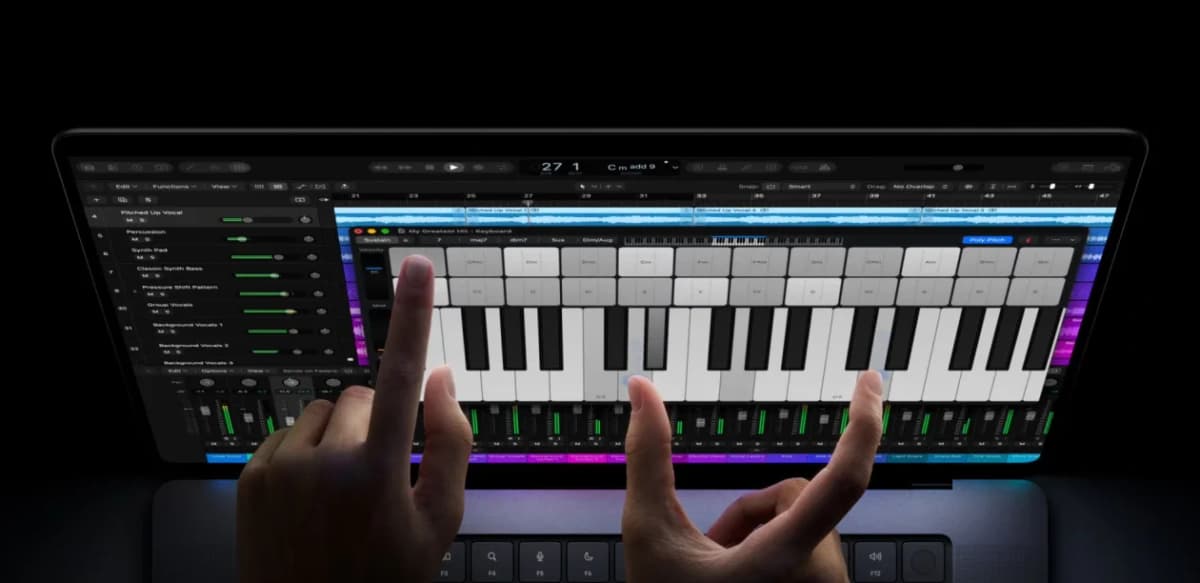
Apple product imagery, not a photograph of my own machine. The new display and touch controls are distinct from the M5 chip upgrade.
But the chips are still M5 Pro and M5 Max, the families Apple introduced in March. An October display redesign does not create another generation of CPU performance. Apple's March M5 Pro and M5 Max announcement
That distinction matters for the benchmarks below. Reviewers have tested the earlier Liquid Retina XDR machines. Their results help explain the chip options; they do not establish sustained performance, cooling or battery life in the new OLED chassis.
My M4 Max vs M5 Max comparison starts with the exact chip
My current M4 Max is the larger 16-CPU/40-GPU version. Apple specifies 546GB/s of memory bandwidth for that chip. I already have 64GB of shared memory for applications, graphics and local workloads. Apple's 16-inch M4 specifications
The relevant alternatives are:
| Chip configuration | Memory bandwidth | Memory options relevant to me |
|---|---|---|
| My M4 Max: 16 CPU / 40 GPU | 546GB/s | 64GB installed |
| M5 Pro: 18 CPU / 20 GPU | 307GB/s | Up to 64GB |
| M5 Max: 18 CPU / 32 GPU | 460GB/s | 36GB |
| M5 Max: 18 CPU / 40 GPU | 614GB/s | 48GB, 64GB or 128GB |
Apple's current PROLED XDR technical specifications list these M5 configurations. The 32-core GPU Max and the 40-core GPU Max are materially different purchase decisions.
The bigger M5 Max raises bandwidth by about 12.5% over my chip. Buying it with 64GB would preserve my memory capacity, not increase it. GPU core counts alone also cannot tell me how much faster an application will run.
Apple's M5 Pro and M5 Max chip imagery from the March launch. The October PROLED range uses the same chip families.
Benchmarks: M5 Max wins, but the workload decides by how much
Notebookcheck's 16-inch review comparison reports these Geekbench 6.7 Metal scores: 179,746 for the 40-GPU-core M4 Max, 137,187 for the 20-GPU-core M5 Pro and 224,987 for the 40-GPU-core M5 Max. Notebookcheck's M5 Max review and comparison
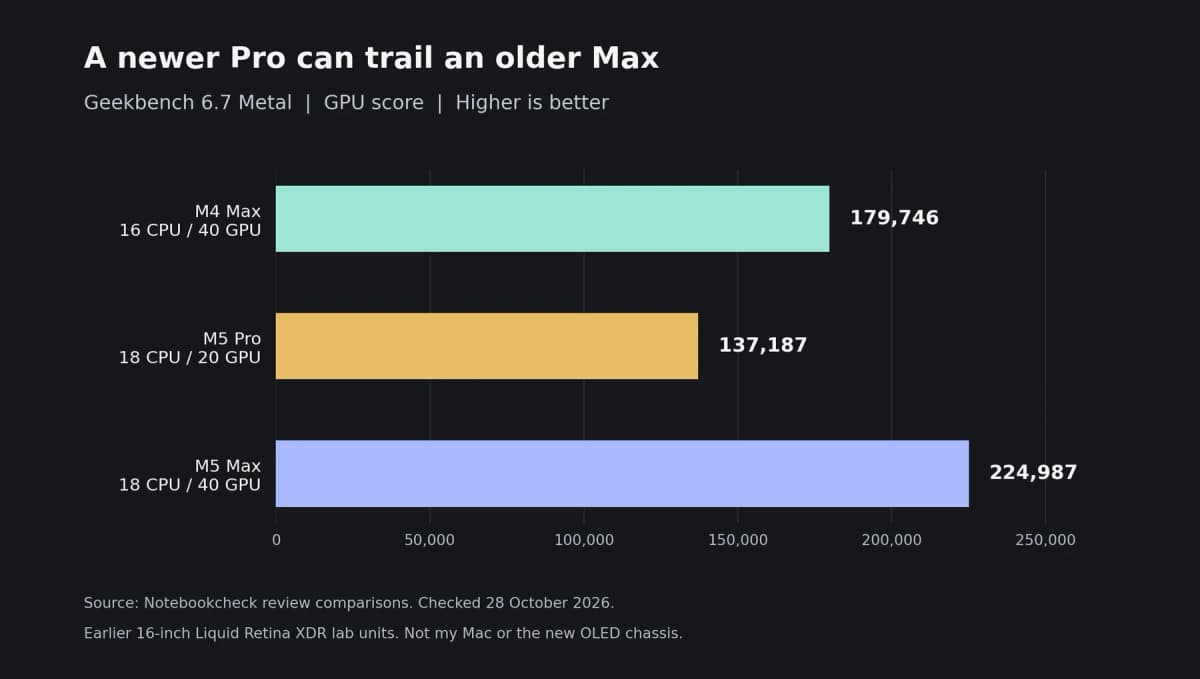
Source: Notebookcheck's published 16-inch review units and comparison table, checked October 28, 2026. Earlier Liquid Retina XDR models, not the new OLED model or my own laptop. Scores measure this synthetic GPU workload, not whole-system speed.
That makes the top M5 Max about 25.2% ahead of the matching M4 Max in this test. The M5 Pro is about 23.7% behind. A newer Pro chip can therefore be a graphics downgrade from an older Max, even when its CPU is appealing.
The rendering results are less tidy. In Notebookcheck's Blender 3.3 Classroom CPU comparison, the M4 Max takes 167 seconds, the M5 Pro 134.5 seconds and the M5 Max 133 seconds. In the Metal GPU version, the same comparison lists 17.8, 36.6 and 23.3 seconds respectively. Lower is better. The underlying M4 Max review and M5 Pro review identify the comparison machines.
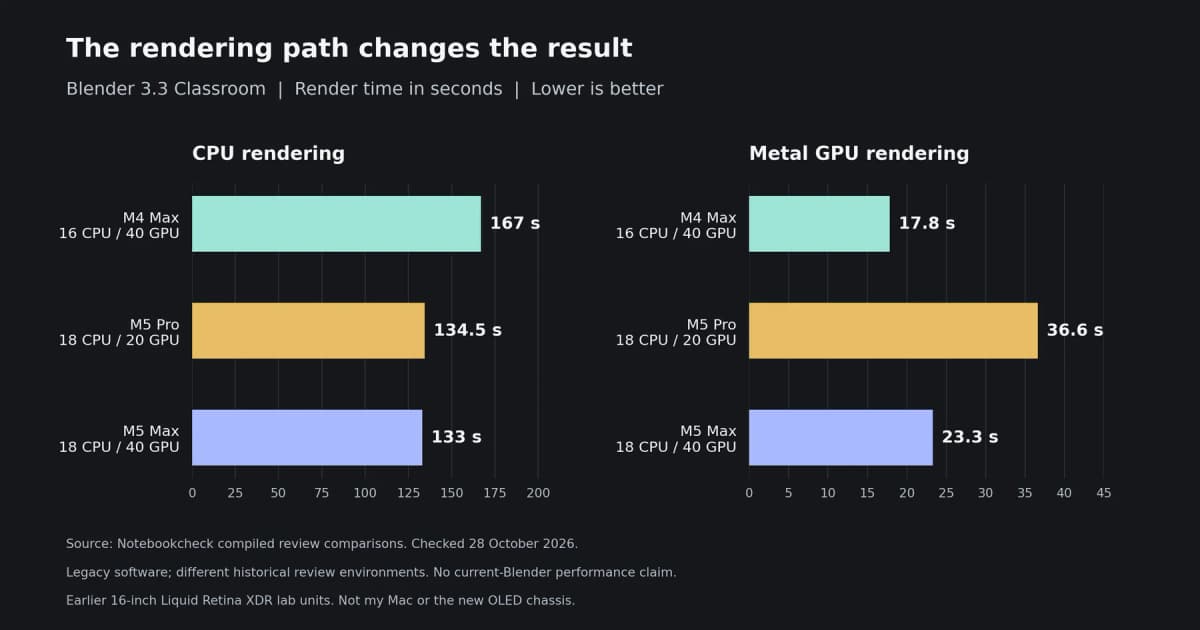
Source: Notebookcheck's compiled review comparison. Separate CPU and Metal paths in the older Blender 3.3 workload; different review units and software environments, not a controlled test of my Mac or a forecast for current Blender releases.
The M5 Max finishes that CPU render about 20% sooner, but takes about 31% longer on the older Metal path. I would not turn one legacy result into a verdict on every M5 application. It does show why I want tests of my actual software before buying.
Which M5 models could be worse than my current Mac?
Base M5: a smaller class of machine
The base M5 MacBook Pro is a 14-inch machine with a 10-core CPU, 10-core GPU and up to 32GB of memory. That memory ceiling is half what I have installed. Apple's base M5 technical specifications
It could make sense for someone who wants a smaller laptop. For me, replacing this 64GB Max workstation with that configuration would give up capacity. A newer architecture does not erase that trade-off, and a quick single-threaded task would not settle the whole comparison.
M5 Pro: plausible for CPU work, weaker for this graphics comparison
The 18-core M5 Pro deserves a fair reading. Its CPU rendering result above is close to the M5 Max, and Apple offers it with 64GB of memory. Someone focused on compilation or CPU-heavy production should test it rather than assume they need Max.
For my mixed-workload laptop, though, I would be accepting lower bandwidth and a weaker result in the cited Metal test. I would choose it only after proving that the CPU benefit outweighed the graphics trade-off in my projects.
M5 Max with 32 GPU cores: the Max name hides a memory downgrade
This model has an 18-core CPU, but Apple's listed configuration has 36GB of memory and 460GB/s bandwidth. Against my 64GB and 546GB/s, both figures go backwards.
That does not mean every task would run slower. It means I would be buying less room for memory-heavy work. I would not replace my current machine with it just to keep the word Max on the box.
What matters for coding, AI agents and music production?
I build software and automation, and I care about music production. Those workloads ask different things of a laptop.
For local builds, I would compare the same project, dependencies and clean-build conditions. For Logic, I would test a real session at the same sample rate and buffer size, including the live recording path. A GPU benchmark cannot tell me how many plug-ins that session will tolerate.
My interest in Logic's announced AI tools does not mean I suddenly need a new Mac. Compatibility and the location of processing matter before peak chip specifications.
AI agents add another distinction. A local model can use the laptop's compute and memory. A remote model runs on its provider's hardware. Spending more on my Mac does not increase the server-side token generation rate of a hosted model. Local tests and builds around that model may still benefit.
That is also relevant to my multi-agent code review workflow: I want to measure the local bottleneck, not assume every agent waiting for a response needs a more expensive laptop.
What are reviewers saying about the M5 Max release?
The earlier M5 reviews give me useful context, with an important limit: they cover the Liquid Retina XDR generation, not a finished review cycle for today's OLED launch.
Macworld's Roman Loyola praises the overall speed and SSD improvement, while listing incremental CPU improvement over M4 Max and higher starting prices among the drawbacks. That sounds more relevant to an existing Max owner than a comparison against a much older entry-level Mac. Macworld's 16-inch M5 Max review
MusicRadar's James Grimshaw is enthusiastic about demanding DAW sessions and multitasking, but treats the price as a serious obstacle for musicians. I can agree with both sides of that assessment: an excellent production laptop can still be an unnecessary replacement for the one I own. MusicRadar's M5 Max review
Notebookcheck's Andreas Osthoff also raises cooling and power-delivery limits under heavy combined load on the earlier 16-inch M5 Max. Apple's new design includes a redesigned thermal system, but I want independent sustained-load testing before assuming it resolves those concerns.
These are attributed reviews, not a survey of all buyers. I have not reproduced their tests.
If I upgraded, which MacBook Pro would I choose?
My shortlist would start with the 16-inch M5 Max, 18-core CPU, 40-core GPU and at least 64GB of memory. That preserves my current memory capacity and gives me the stronger GPU option, instead of exchanging one capability for another without measuring the cost.
The bigger M5 Max is therefore the sensible candidate if I had to upgrade. That is a different answer from saying I should buy it today.
Why I am waiting for the next series
I am excited about what Apple is building. OLED, touch and a lighter 16-inch laptop make this release worth following. But around 81,000 kr is a substantial replacement cost when I already own a well-equipped M4 Max.
For now, I would rather keep building and identify the moments when this machine holds me back. A future series needs to offer a gain I can use and justify. I am not treating an unannounced chip, release date or rumored performance figure as a promise.
I was tempted. I am still interested. I am not buying this one right now.