You do not need another subscription to separate a song into stems. You do need to distinguish a genuinely local free stem splitter from a cloud tool whose free version stops before the feature you wanted.
My starting choices are Ultimate Vocal Remover for a local desktop workflow and BandLab Splitter for a more convenient online route. Audacity's OpenVINO effects can also separate music, but there is an important current version warning. Demucs is the technical option, with a maintenance caveat of its own.
Checked November 11, 2026. This is a source-based comparison of workflows and limits. I have not run a new same-track listening test or measured processing speeds for this guide. There is no invented winner for separation quality.
Free stem splitter options at a glance
| Tool | Where the workflow runs | Free offer | Main limitation |
|---|---|---|---|
| Ultimate Vocal Remover | Local desktop application | Free and open source | Model choice, downloads and your computer's resources |
| BandLab Splitter | Web and mobile cloud workflow | Two- or four-stem splitting | Additional stems and features belong to paid plans |
| Audacity with OpenVINO | Local editor plus separate AI plugins | Free downloads | Official warning about compatibility with latest Audacity |
| Demucs | Local command-line/model workflow | Open-source software | Original Meta repository is archived; maintenance is limited |
These are not four interchangeable engines with four independent quality scores. A desktop application can expose models related to a separate command-line project. Compare the model and settings, not only the app name.
Ultimate Vocal Remover: the local desktop starting point
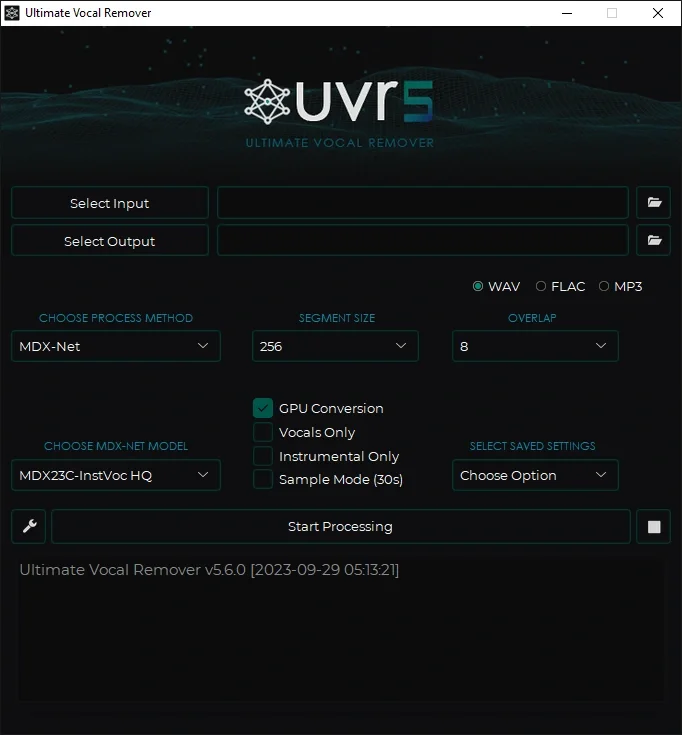
Official project image: UVR v5.6. It illustrates the application, not a new separation test or a guarantee of the latest interface layout.
Ultimate Vocal Remover is a free, open-source desktop application. Its official repository provides downloads and setup information, including separate Apple Silicon and Intel Mac packages.
For me, the appeal is control. A local workflow lets you choose models and keep the separation process on your own computer instead of uploading every unreleased recording to another service. You still need to download software and model files first; local processing is not the same claim as zero network activity during installation.
The setup asks more of you than a web upload. Your machine, chosen model and settings affect memory use and speed. Do not assume a GPU is required for every workflow, or that having one guarantees a particular processing time.
I would start with a short section containing the problem I want to solve. A clean verse tells you less about separation difficulty than the chorus where backing vocals, cymbals and guitars overlap. Compare at least two suitable settings before processing a long library.
Download from the maintained project destinations and keep normal operating-system security protections in place. Old troubleshooting instructions that broadly disable application protection are not a sensible default for installing a music tool.
BandLab Splitter: convenient, with a meaningful free tier
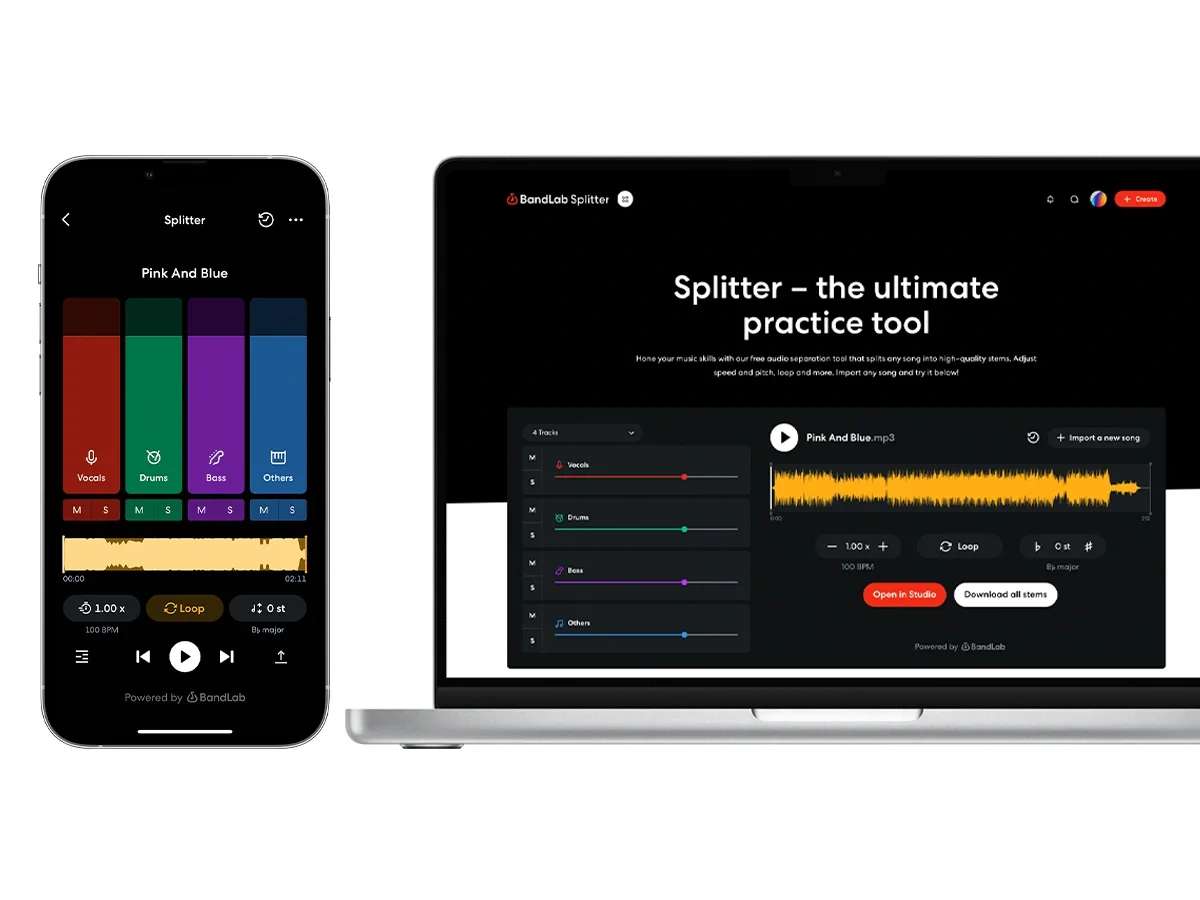
Official guide image: BandLab. Interface layout can change; this image illustrates access to the tool rather than guaranteeing a current plan entitlement.
BandLab Splitter is available through web and mobile workflows. BandLab's current official guide explains how to open the tool and says free users can split into two or four stems, with vocals, drums, bass and other instruments in the four-stem option.
The same guide distinguishes Pro and Max upgrades: up to seven stems and additional features such as MIDI conversion and priority processing. It also states an input-length limit of 15 minutes per media file. Those details are more useful than a broad claim that "BandLab is free."
BandLab's public pages are not fully synchronized: its landing-page FAQ describes six member stems, while the newer Pro/Max guide says up to seven. The free four-stem option agrees. Confirm paid extras in your account before relying on them; I use the newer, more detailed guide for the plan comparison here.
I would try this route when the goal is quick practice material and I am comfortable with an online service. Before uploading an unreleased client track, check your permission to send it to that provider and review the current privacy terms. Convenience does not settle the confidentiality question.
The presence of an "Open in Studio" button is not proof that every connected export or MIDI feature is included in the free plan. Check the operation you actually need, including the final download, rather than assuming the successful split completes the workflow.
Audacity OpenVINO: useful, but check the version first
Audacity's official AI-plugin download page lists music separation into drums, bass, vocals and other instruments. It currently provides Windows and macOS download choices.
It also displays a clear warning: the OpenVINO plugins are not yet compatible with the latest Audacity version. That warning changes the recommendation. Installing the newest editor and the AI add-on is not a verified working combination just because both downloads exist.
I would confirm the supported editor/plugin pair before installing anything, and keep an existing working environment intact until the new combination has passed a small test. If the compatibility boundary is unclear, choose another splitter rather than turn a simple task into a broken editor setup.
An existing Logic user may not need another editor at all. My Logic Pro 13 guide discusses its separation tools. Already owning a DAW with a suitable feature is different from that feature being a free standalone download for everyone.
Demucs: more control, with a maintenance cost
The original Demucs repository documents music separation into vocals, drums, bass and other accompaniment. It also documents an experimental six-source option, with explicit cautions about its results.
The repository was archived on January 1, 2025. Its README points to the author's fork and says the project is no longer actively maintained, with only important bug fixes considered there. That is an operational limitation, not evidence that the existing models suddenly stopped producing useful results.
I would investigate Demucs directly if I wanted a repeatable command-line workflow and was prepared to manage dependencies. For a person who only needs a backing track tonight, a desktop interface may be the better use of time.
Open-source code, model weights and the rights to the input recording are separate questions. A free tool does not give you permission to commercially release someone else's isolated vocal. Check the applicable software, model and music rights for your intended use.
A vocal remover cannot recreate the original session
A stereo master contains overlapping sources, processing and shared effects. Separation estimates useful parts from that combined signal. It does not recover the original multitrack project with every edit, automation move and microphone intact.
Listen for reverb that follows the wrong source, watery high frequencies, softened transients and instrument bleed in the vocal. Backing vocals can be particularly awkward because the distinction between a lead and the rest of the arrangement is not always clean.
An isolated stem can sound strange alone and still work well for practice or a quiet production layer. The opposite is also possible: a convincing solo vocal can expose distracting artifacts once you move it into a new arrangement. Judge it against the intended use.
How I would compare splitters fairly
Use one authorized source file and the same short excerpt in each tool. Keep a copy of the original. Record the app version, model, source count and settings so the result means something later.
My test passage would include:
Compare at similar playback levels. Listen to the vocal, the instrumental and the recombined result. Also check export alignment before assuming stems can be swapped into a project without adjustment.
Only then compare processing time and convenience. A fast split that damages the exact phrase you need is not the better result. A slow local workflow can also be the wrong choice for a deadline.
These are proposed evaluation steps, not results from a test I ran for this article. I would publish audio examples and a reproducible setup before attaching quality scores to the tools.
Which one would I choose?
For local control, I would begin with Ultimate Vocal Remover. For an accessible cloud workflow with a clearly documented free two/four-stem option, I would try BandLab Splitter. Audacity belongs on the list only after confirming the compatible version pair. Demucs is for a reader who wants to manage the model workflow directly.
The next step after separation is often editing and mixing. My RysUpAir first look and free plugin roundup cover tools to investigate, but no EQ can reliably restore information a separation process removed.
Research and drafting were AI-assisted. The cover is an AI-generated editorial illustration. The inline images show the real UVR application and material from BandLab's official guide. No new separation-quality benchmark or hands-on speed test is claimed.