Rys Up Audio emailed me about RysUpAir, a free vocal EQ. A small plugin with a clear job catches my attention faster than another promise to fix an entire mix.
This is a first look based on documentation, not my own session results. I cover the features, the download process and the coverage so far. My interest is in what it could add near the end of a vocal chain: a little openness, without turning every consonant into the loudest part of the performance.
What does RysUpAir do?
RysUpAir has two advertised shelves: 2.5 kHz for mid presence and 6 kHz for high air, plus Link and an analyzer. The developer lists Mac Universal and Windows 64-bit builds: AU/VST3/AAX on Mac, VST3/AAX on Windows. RysUpAir product and compatibility details.
Think of it as a focused tone-shaping option. I would reach for this type of tool when the recording already works but feels slightly closed-in. I would keep a general-purpose EQ available for cuts and more specific adjustments.
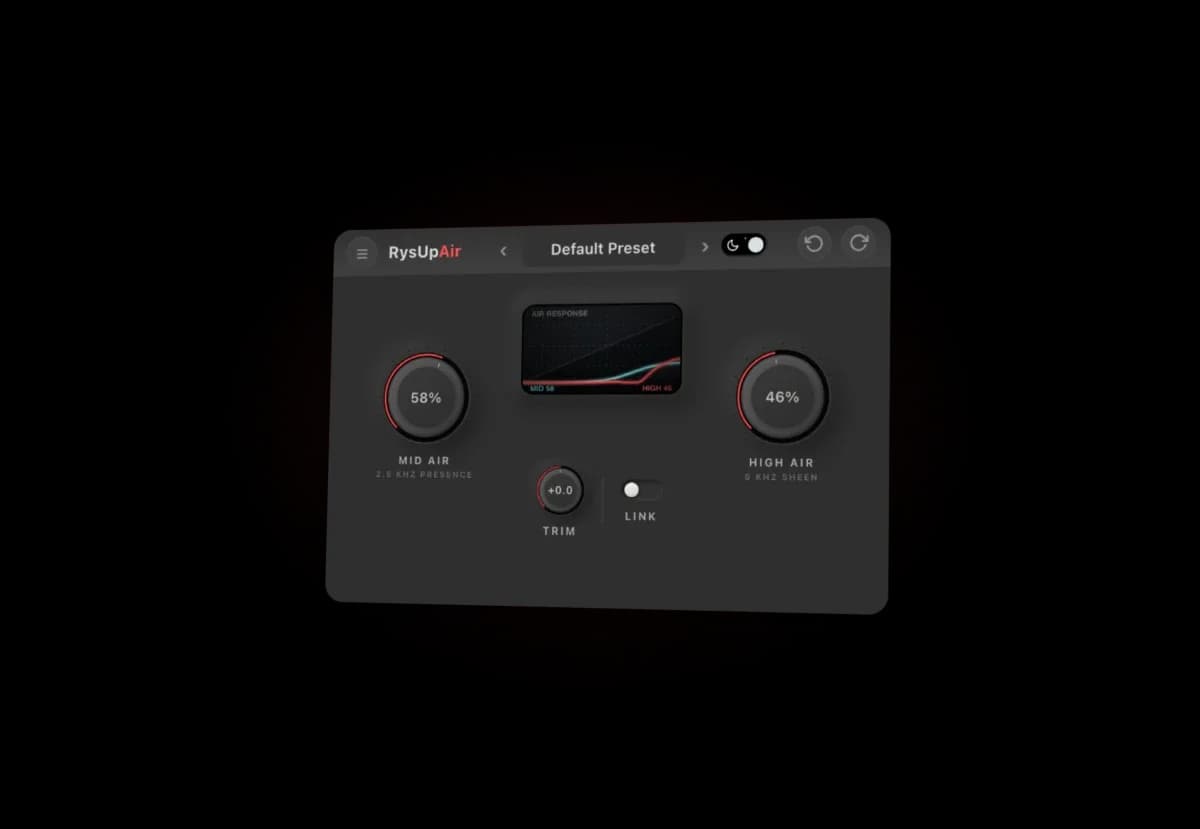
Official product artwork from Rys Up Audio. The displayed settings are an illustration, not my preset or a listening-test result.
Where would I put it in a vocal chain?
Rys Up Audio's Fresh Air comparison presents RysUpAir as a finishing stage after cleanup, compression and de-essing. That is the starting point I would try, rather than a fixed rule for every recording.
I would listen to the whole arrangement before adding much top end. A vocal that feels dark in solo may already sit well beside bright cymbals and synths. More air can also draw attention to breaths or background noise. The useful question is whether the words become easier to follow at the same playback level.
If sharp consonants are the problem, I would deal with those first. My guide to de-essing and compression for vocals covers those earlier decisions. I would not expect a brightening tool to replace them.
Free plugin, but what do you need to install?
RysUpAir's full free version has no trial cutoff or watermark. Email signup provides the install link. RysUpAir's download page.
Installation runs through RysUpHub. Its official guide describes signing in, choosing a plugin and managing installation, updates and activation. The Hub supports macOS 12 or newer and Windows 10/11. Those are the manager's stated requirements; check the plugin's current build against your DAW too. RysUpHub installer and requirements.
I would test it in a copy of a session before changing a working setup. Keep the old chain available and confirm that the project reopens properly. A free download still asks for your time and another piece of software to maintain.
RysUpAir vs Slate Fresh Air: the useful differences
The similar names and two main controls make this an obvious comparison, but they describe different processing approaches.
Slate describes Fresh Air as a dynamic high-frequency processor inspired by vintage exciters. Its manual documents Mid Air, High Air, Link and Trim, including output adjustment for level matching. Slate's Fresh Air manual.
Rys Up Audio describes its own design as vocal-focused shelf curves with a spectrum display. Its comparison page also specifies Hub activation without an iLok account. That is the developer's explanation, not proof that its sound is better. The developer's Fresh Air comparison.
Slate's current free redemption guide asks for an account and a linked or newly created iLok ID. It lists machine, cloud and dongle activation, so a physical USB dongle is not mandatory. Its product page currently advertises a free offer for a limited time.
I would compare both on the same recording, with the output levels matched. Matching knob percentages would not be a fair test: different designs can respond differently to the same-looking settings. I want to hear which one helps the vocal fit, not which one makes the most dramatic solo demo.
What are other people saying?
Noizefield's September 26 coverage emphasizes the focused controls and free availability. Free VST Hub's listing highlights the dual-band design and analyzer. Both are useful release coverage, but neither article documents a controlled listening comparison.
There is also an enthusiastic Ditto Music article about affordable plugins that mentions RysUpAir. Its byline disclosure says Rys Up Audio wrote it. I would read it as the developer's argument for its tools, not an independent endorsement from a test panel.
During this research, I found more announcements and developer explanations than detailed RysUpAir session reviews. That leaves room for a useful follow-up with audio examples. I cannot turn the current coverage into a claim that producers agree it beats established plugins.
How I would test RysUpAir
My first test would stay small enough to finish:
I would add Fresh Air as another option if it is already installed. I would also listen after a short break. A brighter sound can be exciting on the first pass and tiring a few minutes later.
My take: a focused free tool worth investigating
The limited scope is what interests me. A plugin can earn a place in a session by making one recurring decision quicker. RysUpAir's documented design gives me a reason to investigate it. A sound verdict needs a real-session comparison, which this article does not provide.
It fits the wider free-plugin wave I have been following. My VST picks by category cover the rest of the toolbox. The aim is to find a useful addition, not rebuild a working chain around every new release.
Start with the official RysUpAir page, check your setup, and compare it with the tools you already trust.