A mobile visitor should be able to read a category page before the browser finishes loading everything behind it. That was my starting point for a week of vape website performance work at Cigge, from September 25 to October 2, 2026.
Cigge is a Swedish online retailer with a vape and e-cigarette catalogue at Cigge, e-liquids and accessories. Cigge's company page describes the business and its online shop. I work on the technical site; this is an account of that work, not an independent product recommendation.
The work covered first-viewport CSS, JavaScript loading, duplicated catalogue data and cache behaviour. One controlled preview comparison recorded a lower mobile simulated Largest Contentful Paint: a median of 5.62 seconds in the control versus 5.176 seconds after the changes, within a specific group of test runs.
That result needs context. It is a lab comparison on preview environments, not a claim that every visitor now sees the whole website load 7.9% faster.
A Swedish vape website still has to behave like a real shop
An ecommerce category page has more responsibilities than a landing page. It has to render product information, keep prices and availability correct, support filters and sorting, and let visitors navigate back without losing their place.
For a site serving customers in Sweden, mobile layout and readable Swedish content matter alongside loading time. A category heading that appears quickly is useful. A fast heading followed by a broken filter or a shifting product grid is not enough.
Cigge uses a Next.js storefront with PrestaShop behind the catalogue. That separation gives me control over what the browser receives. It also makes it easy to send more data and JavaScript than a particular page needs.
I approached the week as a set of small changes with regression checks. I wanted to remove unnecessary work while keeping the shop's existing behaviour.
The first diagnosis: look beyond the score
The September 28 public homepage payload audit recorded 987,836 bytes of HTML. Inside that document, the embedded React Flight stream accounted for 492,120 bytes. Flight is the serialized data React uses to carry server-rendered component information to the browser.
The same audit identified 270,853 bytes of page-builder initial state, 96,628 bytes of translation messages and 47,640 bytes of bootstrap data.
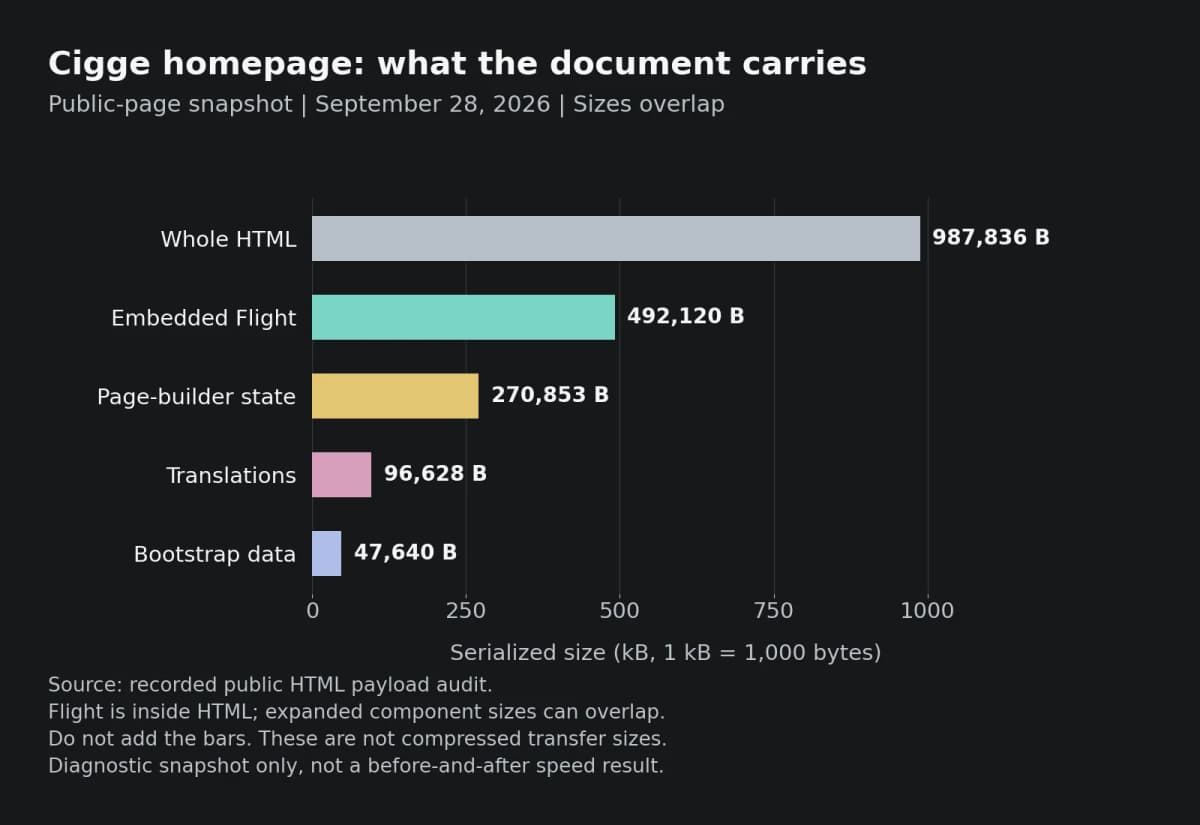
Source: our recorded public-page payload audit. These are serialized byte counts, not compressed network transfer sizes. The categories overlap: the Flight stream sits inside the document, and expanded component data can overlap within Flight. Do not add the bars together. This is a diagnostic snapshot, not a before-and-after result.
Those numbers helped me ask more useful questions. Does this route need the full brand list immediately? Does a product card need product-detail fields? Are we copying identical pricing rows into multiple variants?
I would rather answer those questions than remove data at random to make a report greener.
Give the first viewport its styles first
I separated the CSS needed for the first visible screen from the larger storefront style profiles. The server includes the critical subset in the HTML, so the browser can style that screen without waiting for the full profile stylesheet.
The later category-page changes defer the larger profile until the first contentful paint. That means the browser can display the content before requesting styling that the initial screen does not need.
This requires care. Client-side navigation still needs the right styles. Background tabs cannot wait forever for a paint event. Visitors with JavaScript disabled need a fallback. I kept those cases in the implementation and its checks rather than treating the initial screenshot as the whole job.
There is a trade-off: on slower connections, styling farther down the page can arrive later. Critical CSS has to cover the actual first viewport, and an early scroll deserves testing. Deferring a stylesheet without checking that boundary would risk exchanging a loading delay for a visibly unfinished page.
Move optional work out of the first-paint window
On the category page we investigated, the Largest Contentful Paint element was description text, not a product image. Compressing another image would not address that particular bottleneck.
I moved the recent-category recorder into a separate, deferred client chunk. It still records the visit for the quick-access menu, but it does not need to compete with the first visible content.
The header and footer logos also moved to same-origin image paths through the existing image proxy. The image content stayed the same; the request no longer needed a separate storefront-to-CDN origin connection for those assets.
I also kept home-only client code on the homepage instead of loading it through category and product routes. Search and catalogue interactions remain available where visitors need them. The aim was to make each route carry its own responsibilities.
The measured category-page result
How the comparison ran
The recorded comparison used PageSpeed Insights mobile tests against two preview environments on the same code base and staging data: a control and the changed version. It ran eight alternating rounds per store, with at least 75 seconds between requests to the same URL.
The test record separated runs by when the observed first paint happened relative to the document finishing. The graph below shows only the late-paint group, with four to five runs per side. It does not summarize all eight rounds.
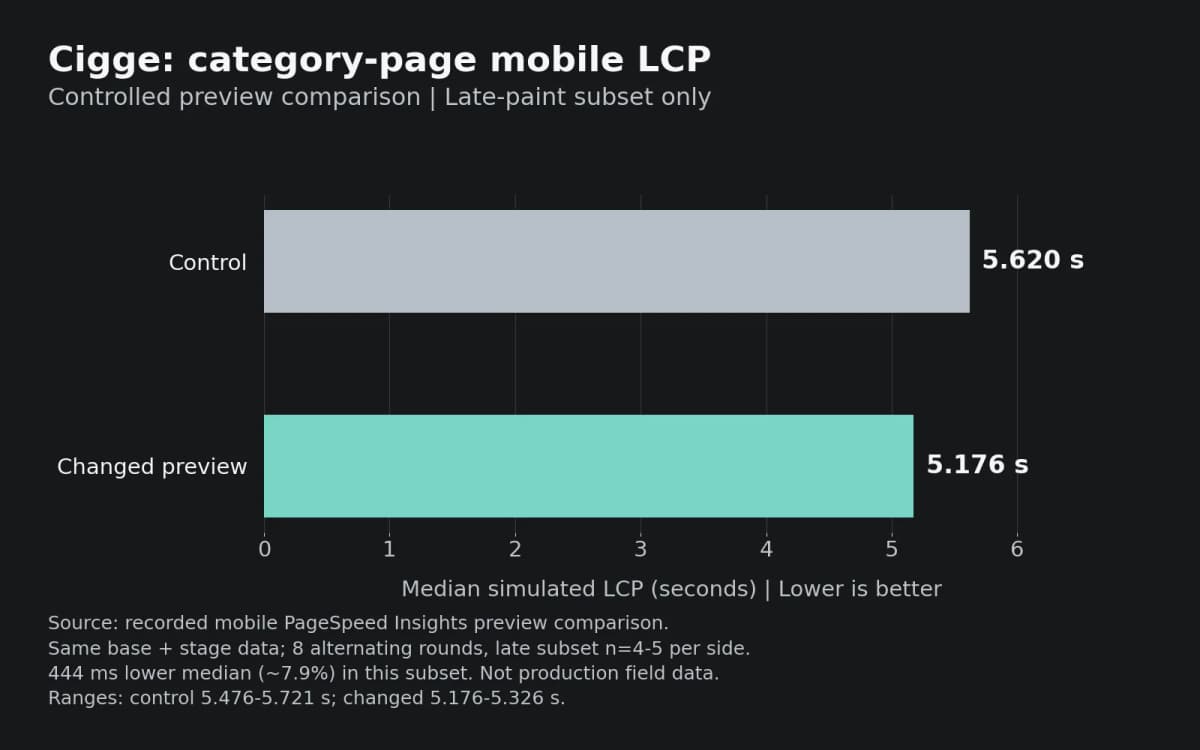
Source: our recorded preview comparison. Lower is better. The difference between these medians is 444 milliseconds, or approximately 7.9%. These are simulated lab timings for the late-paint subset, not production visitor measurements.
What the numbers mean
The control range was 5.476-5.721 seconds; the changed-preview range was 5.176-5.326 seconds. The ranges did not overlap in that recorded subset. Earlier-paint runs behaved differently, so I would not turn this result into a site-wide percentage.
I find that distinction useful when discussing PageSpeed with a client. We have evidence that a specific change reduced a specific measured delay under the tested conditions. We still need field data to understand the effect across real devices and networks.
Less browser JavaScript without dropping HTML checks
Another change moved storefront HTML sanitization to server producers. Previously, public client bundles included DOMPurify to sanitize content the server also rendered.
The recorded build comparison found about 15.4 KB less initial JavaScript, compressed with Brotli quality 3, on the Cigge category route. That is a bundle measurement, not another percentage improvement in loading time.
The implementation keeps sanitization on the server and sends sanitized fields to the rendering components. Administrator editors can still load the sanitizer when editing requires it. A build guard checks that the library does not return to ordinary storefront client chunks.
I would not remove an HTML trust boundary to save bytes. Moving the work requires tracing the producers, dynamic responses and browser-storage paths. The review record includes those checks, along with comparisons of rendered markup and interactive flows.
Send catalogue data once, where possible
The week also included a smaller client catalogue projection. Some variant records repeated the same product-level pricing rows. The implementation removes identical copies while retaining variant-specific differences and the full records where product detail needs them.
Brand data follows a similar principle. The storefront no longer needs to include the full manufacturer list in the initial bootstrap for every page. Search and brand controls request it when needed, with shared loading and retry handling.
These changes require more judgement than deleting a field from a response. Prices, variant selection, stock and navigation must keep working. A smaller payload only helps if the visitor still receives the information the interface promises.
Cache work followed the same logic: invalidate the content that changed, avoid rebuilding unrelated pages, and warm selected catalogue routes after deployment. Stock-sensitive information still needs its own correctness rules. A warm cache is useful; stale availability is a defect.
Vape website performance and SEO
For this vape website performance case, I keep laboratory measurements separate from visitor experience. Google's guide to measuring Web Vitals explains the difference between controlled lab data and real-user data. PageSpeed Insights field reporting covers the preceding 28 days, so a week of changes does not immediately replace the whole reporting window.
LCP describes loading of the largest visible content, INP describes interaction responsiveness, and CLS describes unexpected layout movement. Google's Web Vitals overview explains the metrics and their thresholds. A loading test alone cannot establish the quality of every interaction.
A Swedish vape catalogue also needs useful category information and reliable mobile navigation. I want visitors to find readable content and working controls, rather than a page built around repeating a search term.
Google says Core Web Vitals contribute to its ranking systems, but good scores do not guarantee top positions. Its page-experience guidance also warns against chasing a perfect score purely for SEO. I am not claiming a ranking or conversion increase from this week's work.
What I would check next
The reviewed category first-paint work and server-only sanitization changes merged during this period. The recorded checks include production builds, browser navigation and markup comparisons. I am reporting those engineering records here, not presenting them as a newly repeated production audit.
My next checkpoints are:
I have written about keeping an existing backend while rebuilding the frontend in Headless WordPress AI Migration in One Day. The backend differs here, but the responsibility is similar: preserve the business workflow while improving the public experience. My headless deployment follow-up covers the separate release concerns.
For me, the useful result of this week is a clearer loading sequence, less redundant browser work and a measured category-page improvement under documented conditions. That is a stronger basis for the next change than a screenshot of one unusually good score.
If your ecommerce site needs the same investigation, contact me about a performance review. I can help separate payload, rendering and cache problems, then define checks that protect the existing customer flows.
Visual note: the hero is an AI-generated editorial illustration, not a screenshot of Cigge or a performance report. The two charts use the recorded measurements described above.