A useful vocal chain does not need a monthly bill. The best free vocal plugins solve a few specific problems: uneven level, harsh consonants, a muddy tone and a vocal that feels disconnected from the track.
I would build a small chain around five tools rather than download fifty effects. TDR Nova handles corrective and dynamic EQ, Klanghelm DC1A controls level, MAutoPitch offers optional tuning, RysUpAir adds optional brightness and Valhalla Supermassive provides creative space.
Checked November 11, 2026. This is a source-checked buying-and-workflow guide, not a new listening shootout. The processing suggestions below are starting points to audition on your own recording. The core chain can cost $0 in plugin licenses; your DAW, computer and recording equipment are separate.
Free vocal plugins: the short list
| Plugin | Job in the chain | What to know before downloading |
|---|---|---|
| TDR Nova Free | Corrective EQ and dynamic de-essing | The free edition is separate from Nova GE |
| Klanghelm DC1A | Straightforward compression | Freeware; input level influences the compression |
| MAutoPitch | Optional automatic pitch correction | Included in MFreeFXBundle; paid extras are separate |
| RysUpAir | Optional high-shelf brightness | Free plugin, installed through RysUpHub; email signup |
| Valhalla Supermassive | Reverb and delay on a send | Free effect; especially useful for creative space |
You do not need all five on every vocal. A clear recording may need little corrective EQ, and an expressive performance may be better without tuning. A chain is a set of decisions, not a requirement to fill every insert slot.
TDR Nova Free: EQ and de-essing in one tool
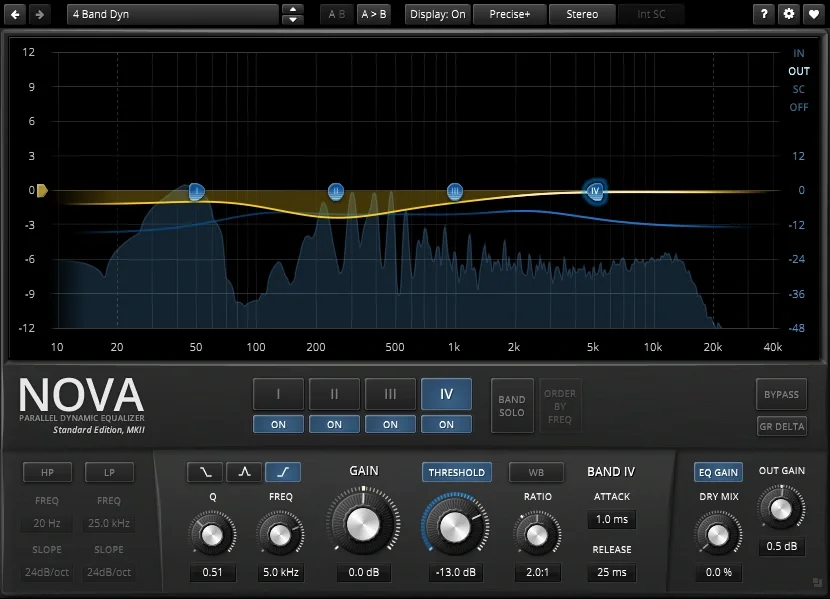
Official interface image: Tokyo Dawn Labs. Download TDR Nova Free.
Nova provides four dynamic EQ bands plus high-pass and low-pass filters. Each dynamic band can respond to level rather than applying the same reduction throughout the performance. Tokyo Dawn explicitly includes sibilance control among its applications.
That makes Nova a useful place to start for a vocal that alternates between clear words and sharp "s" sounds. Find the unpleasant area by listening, set a band there, then reduce it only when it becomes excessive. Avoid turning a temporary problem into a permanent darkening of the entire take.
I would also check low-frequency rumble and excessive proximity effect. A high-pass filter should remove a problem, not automatically thin every singer to the same shape. The correct cutoff depends on the voice and recording.
The developer offers a separate paid Gentleman's Edition. Follow the free download section if you want the $0 chain. Its Nova manual explains the controls; screenshots of GE elsewhere should not be treated as the free edition's feature list.
Klanghelm DC1A: control level without a wall of knobs
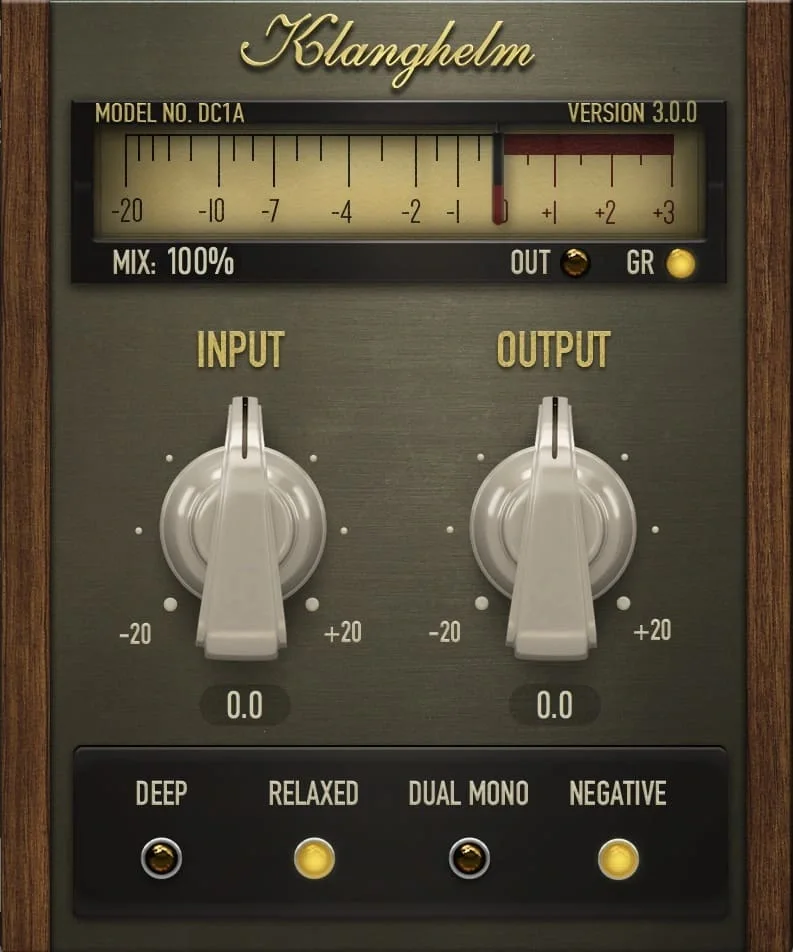
Official interface image: Klanghelm. Get DC1A.
DC1A is freeware with a deliberately small interface. Its main Input and Output controls make it a different proposition from a compressor with a conventional threshold, attack and release panel. Increasing the input changes how hard you drive the processing; match the output before deciding whether it helped.
My first step would still be clip gain. Turn down a few unusually loud words and lift a phrase that disappears before asking a compressor to solve the whole performance. Then add enough compression to help the vocal stay in place.
Listen to the ends of words and the breaths. If the vocal suddenly feels pinned down, try less processing rather than another compressor after it. The goal is a readable performance in the mix, not an impressive gain-reduction display.
DC1A includes additional modes such as Relaxed and Deep, described on the official page and in its manual. Treat them as options to audition, not automatic vocal settings.
MAutoPitch: free tuning, when the song needs it
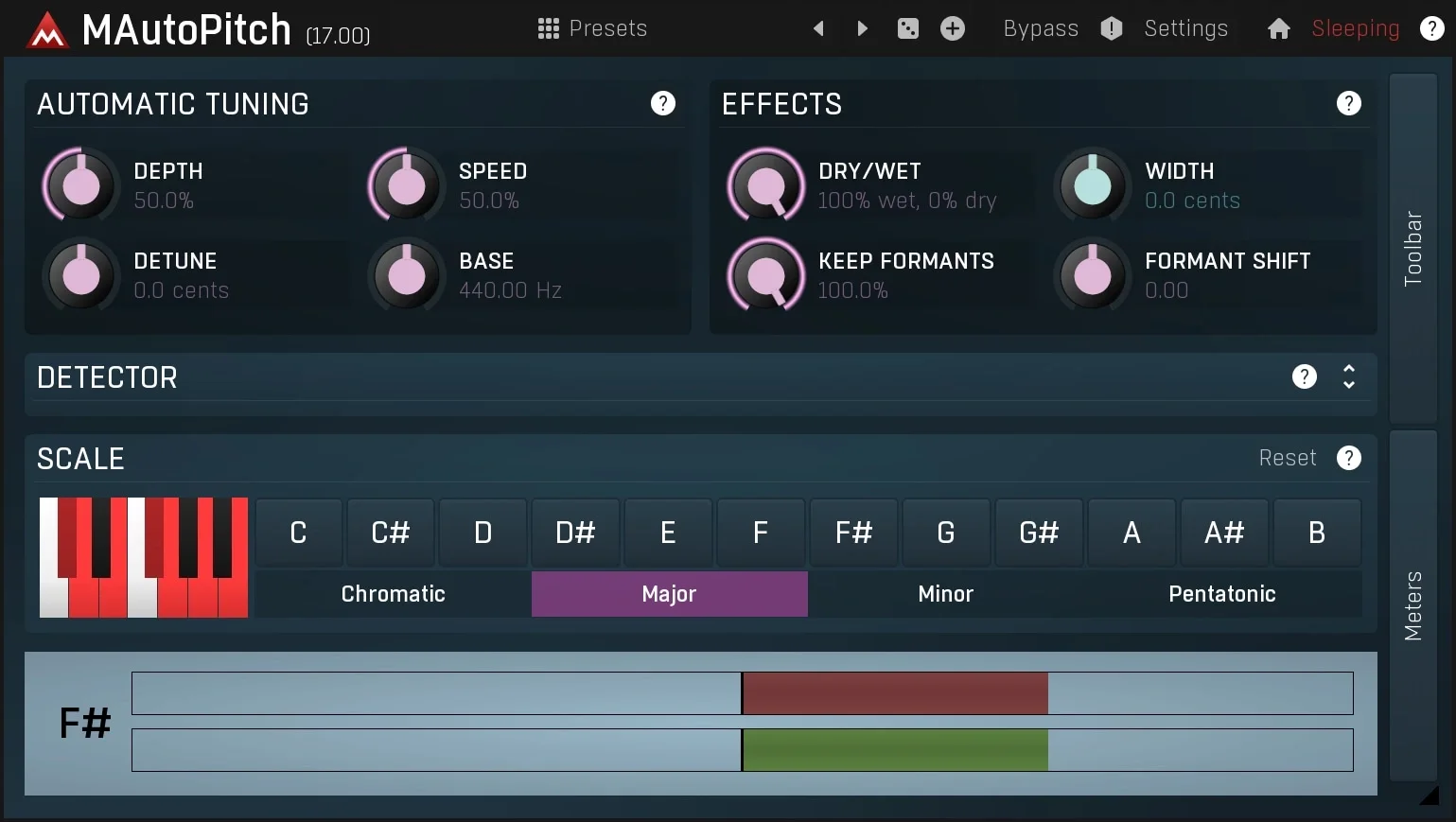
Official interface image: MeldaProduction. MAutoPitch.
MeldaProduction supplies MAutoPitch as a free effect in MFreeFXBundle. It offers automatic pitch correction for vocals and other monophonic sources, with additional creative controls including formant shifting.
Automatic correction is not the same workflow as drawing individual notes and transitions in a detailed pitch editor. Set the song's key or permitted notes correctly, then decide whether you want a subtle adjustment or a deliberately obvious effect.
I would start gently and check held notes, slides and transitions between phrases. A technically centered note can still feel wrong if correction erases the singer's movement. Double-tracked vocals also deserve a separate check: two differently corrected takes can pull against each other.
The free bundle page distinguishes its included effects from paid upgrades. You do not need to mistake a premium feature or paid bundle offer for a requirement to use the free tuner.
RysUpAir: brightness near the end, not a rescue operation
The developer describes RysUpAir as a free high-shelf vocal EQ, with Mid Air and High Air controls. Downloads run through RysUpHub, and the page asks for an email address. The wider suite and its subscription are separate products.
I would audition this after basic level control and de-essing. First make the vocal understandable; then decide whether a little top-end lift improves its place in the arrangement. If the recording contains hiss or sharp consonants, brightness can bring those forward too.
The cover is an AI-generated editorial illustration. The product images inside the guide are official developer materials, not screenshots from one of my sessions. My RysUpAir first look goes deeper into the download workflow and the questions I want to test.
My take: an air control is useful when it saves a specific EQ move. It is not a substitute for a good recording, and there is no reason to brighten a vocal that already sits well.
Valhalla Supermassive: put space on a send
Valhalla Supermassive is a free delay-and-reverb effect. I would choose it here for creative depth, repeats and atmospheric tails rather than assume every preset is a restrained vocal room.
Start on an auxiliary send. That lets the dry vocal remain clear while you control the amount of space separately. On a busy verse, a long tail can fill every gap; a shorter setting or quieter return may serve the song better.
For a more dramatic chorus, automate the send or use a throw on selected words. You do not need the same wet amount throughout the song. Always judge it with the beat playing, because a beautiful solo reverb can make the finished arrangement less readable.
A complete free vocal chain you can adapt
My starting order would be:
This order is a practical example, not a rule. Moving de-essing before compression can make sense; a second light stage can also work. Listen for the problem each stage solves. Bypass anything that cannot justify its place.
Compatibility matters more than another download
Check the developer's current installer, operating-system requirements and plugin formats before installing. Logic needs an Audio Unit version, while many other hosts use VST3; an Apple Silicon build and an Intel-only build are not interchangeable assumptions. Free does not mean every plugin supports every platform or every old DAW.
RysUpAir lists macOS and Windows with AU, VST3 and AAX options. The other developers publish their own package requirements. Get installers from the official links above, and save a copy of a working version when session recall matters.
My free plugin roundup covers more options. If you are comparing paid tools, use the VST guide by category to identify a missing job before shopping.
What I would spend time on first
I would rather learn Nova's dynamic bands and make one compressor work reliably than collect ten alternatives. Finish a vocal with this small setup, export it, and listen away from the project. Write down the specific thing that still fails.
That note tells you what to learn or buy next. A subscription should solve a demonstrated limitation, not become the entrance fee for mixing a vocal.
Research and drafting were AI-assisted. Product images are official developer materials. This guide provides source-based workflow advice and does not claim a new hands-on comparison of these plugins.